

Imagine typing “the dog digging near the back fence” into your security app and actually getting the exact clip — not scrolling through three hours of footage hoping you spot it. That’s the pitch behind Reolink’s newest hardware release, and it might be the biggest shift in home camera AI since motion detection first showed up.
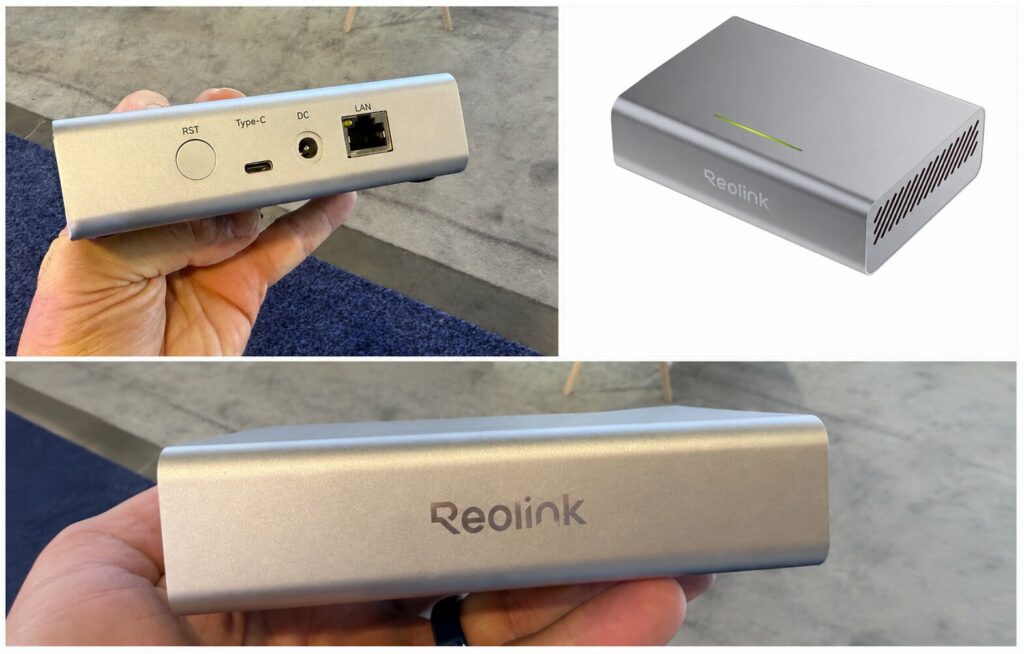
What the AI Box Actually Is
Most “smart” security cameras today still lean on the cloud to do their thinking — your footage gets uploaded, processed on a server somewhere, and sent back as an alert. Reolink’s new AI Box flips that model. It’s a standalone hardware hub, built around a Qualcomm Dragonwing Q8 processor, that handles all the AI processing itself, on your network, with no internet connection required to function.
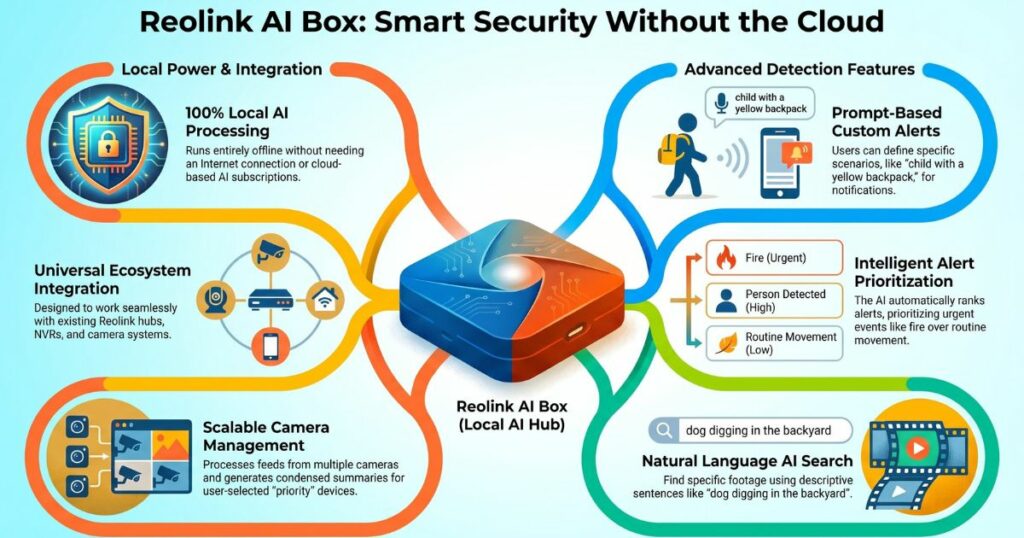
Why Local Processing Matters
That local-only design matters for two reasons: your footage never has to leave your property to get analyzed, and there’s no monthly fee attached to using the AI features — a sharp contrast to brands where the “smart” part of a smart camera only works once you’re paying for it.
Key Features That Set the AI Box Apart
The AI Box isn’t just a faster processor bolted onto a camera — it introduces a handful of features that genuinely change how you’d interact with your footage day to day.
Describing What You’re Looking For, Not Just Searching Keywords
Traditional camera search works on rigid keywords — you search “person” or “dog” and get every match, sorted by time. The AI Box is built to understand full sentences instead. You could search “a dog digging in the backyard” and it filters for that specific event, not just any dog on camera. It can reportedly pick out fine details too, like identifying “a person wearing glasses” within a clip.
This kind of natural-language video search has mostly lived in expensive commercial security systems until now. Seeing it positioned for a home setup — attached to a hub with no recurring cost — is a meaningfully different product than what’s currently sold as “AI” in most consumer cameras.
Alerts That Understand the Difference Between a Fire and a Cat
One of the more practical ideas here is priority-based alerting. Instead of every camera treating every trigger as equally urgent, the AI Box is designed to weigh events against each other — so if one camera picks up a fire while another catches a pet knocking something over, the fire alert gets pushed to the top instead of getting buried under routine notifications.
This directly targets the biggest complaint people have with multi-camera setups: alert fatigue. A system that actually understands which of ten notifications matters most is solving a real problem, not just adding a gimmick.
Custom Prompts for Specific People, Pets, or Scenarios
Beyond generic detection, the AI Box reportedly lets you set up custom prompts tied to specific descriptions — a white cat, or a kid coming home wearing a particular backpack. Instead of a blanket “person detected” notification, you’d get an alert built around the exact scenario you actually care about tracking.
Whole-Property Activity Summaries
The system also appears able to generate summaries across multiple cameras at once, compiling activity from your whole property into a single overview instead of forcing you to check each camera individually — useful if you’re managing more cameras than you have patience to review one by one.
Works With Cameras You Already Own
Maybe the most practical detail here: this isn’t a “buy all new cameras” situation. The AI Box is designed to add these AI capabilities to existing Reolink cameras, hubs, and NVRs, meaning older, non-AI hardware could gain these features without replacement.
Choosing Which Cameras Get Priority
You’d also reportedly be able to choose which specific cameras get full AI treatment — useful if you’ve got a large setup and only care about prioritizing a handful of key spots, rather than applying AI processing evenly across every camera on the property.
The Catch: It’s Not Available Yet
Worth being upfront about where things actually stand: as of now, the AI Box is still in a prototyping phase, with no confirmed pricing or release date. Everything above describes what’s been demonstrated and reported so far — not a finished, shipping product you can buy today. Treat this as “what’s coming,” not “what to buy this week.”
Why This Matters Even Before It Ships
Regardless of exact release timing, this signals where camera AI is heading industry-wide: local processing over cloud dependency, natural-language search over rigid keyword matching, and smarter prioritization over blanket notifications. If you’re currently frustrated with a subscription-gated camera that still can’t tell a delivery from a raccoon, this is the direction to watch — and a reason to hold off on a new subscription-locked system if a genuinely subscription-free alternative might be close behind.